Thursday, September 10, 2015

Oneview Dashboard Customizations

Now if you have been following me, especially on Linkedin, you know I'm no longer running the Network and Security teams at Extreme. That doesn't mean though that I'm not still in touch with people there and in touch with what's going on over there.

I'm doing consulting and contract work, but also looking for full time work. If you know anyone who wants to improve their IT efficiency, has security concerns and or is looking for a good IT leader or strong lieutenant please reach out.

This week though I'm helping a long time customer with a NAC and Security assessment. Part of that is helping to customize their Netsight instance to be a bit more useful to them. They are an Extreme customer from the Enterasys days so they have all Enterasys switches, not wireless though.

If you use Oneview, which is the web based interface to Netsight, you have probably seen the dashboards that exist. The NMS dashboard is sort of the main one I used to use. It's a good overview of the health of the network. If you don't use Extreme wireless though the entire middle pane is wasted.

So I wanted to change that to show NAC (or Identity and Access Manager if you like that name better). I figured since I was doing the work, I'd share with you how easy it is to do.


Login to Oneview and go to the administration tab, then click on Report Designer.


Choose the “system reports” you want to change. The main screen is NMS Dashboard but you can also change the Purview or Identity and Access Manager ones as well.


Simply change the Component name to be the data you want to show and then click save.


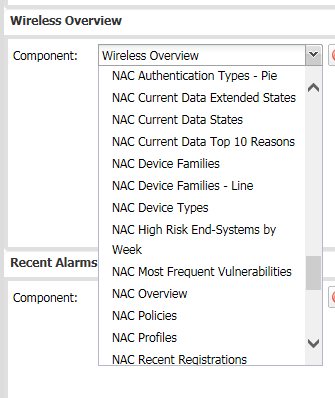
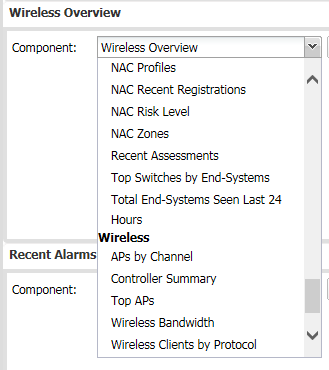
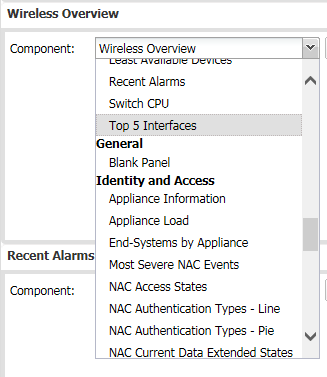
You can only use existing components but there are quite a few. These are some of the Identity and Access ones.


It will bring up the new Dashboard automatically.


If you want to delete it, go into the My Reports at the top. (not the one you originally edited) , highlight the one you want to get rid of and hit the delete icon.

The help files in Netsight are really good about this as well.

Hope it helps!


Tuesday, May 12, 2015

Securing insecure devices

I'll bet a lot of people read this post already http://boingboing.net/2015/05/07/drug-pump-is-most-insecure.html

It talks about one particular medical device that has practically no security. No passwords, open telnet by default and a root shell. Yikes! For those not really into IT security, that's really bad....

It also talks about some other devices that are almost as bad. But in the medical space these devices are needed. I mean if someone doesn't get the right dose of drugs they will die and if this is the only machine available (I'm not saying it is), then until it is really fixed patients and doctors unfortunately need to roll the dice and hope for the best. Sort of like we all do with identity theft every day, but that's a different story.

So what can CIOs and CISOs do to protect them? Well the short answer is get after the vendors, but in the real world that takes time and honestly a lot of time IT just doesn't carry that much weight to over rule the medical professionals. As much as that's the right thing to do, it's not the effective thing to do.

Instead secure the network and don't allow unauthorized machines to connect to these devices. Tools like Network Access Control (NAC) and Network policy have been around for years (decades in some cases) and allow IT administrators and security experts to restrict  how and who can connect to these insecure devices.

For example, if people outside of IT shouldn't be allowed to telnet to the drug pump, the network can simply block all access to it. You can even go a step further and log if someone tries to telnet to it and alert security to investigate who did it and why.

If you are worried about someone unplugging the pump from the network and plugging it into a switch to tamper with it, you can even monitor the device and alert when it goes offline. That's probably not a bad thing to do actually in case the device fails.

I think we need to stop throwing our hands up and saying "The device isn't secure, it's not fair" and instead look at when we can do today with existing technology. We can make things better so don't give up.

Thursday, April 30, 2015

IT Communications you should be doing, but aren't

IT has a reputation of not communicating well. Which is sort of funny, if you think about it, we enable all sorts of communications from voice mail, video conferencing, e-mail, instant messaging and the list goes on and on.
So here are a list of communication tips you should be using. Many of these are informal communications, things I wouldn't send out to the whole company on email, but using a tool like Chatter from Salesforce.com, SharePoint from Microsoft, or even an internal blogging platform is a great way for people that are interested in what is going on, to be able to know. It also has the benefit of letting me not feel like an internal spammer.
  1. System down alerts. This includes all the times that something fails but doesn't cause an outage. What a great way to market all the thought you put into redundancy, fail-over and availability without sounding like a self-promoting ass. Of course outages that do cause a significant impact need to go here too. Hopefully you don’t have too many of those.
  2. Roadmaps – We all know that roadmaps change, and sometimes pretty frequently, and I know that’s why a lot of us don’t share roadmaps. The trick is to add the commentary so when it changes people understand why it changed. It’s also a great way for people to know what is coming and to be able to proactively train on them before they need to use them.
  3. Informal notifications on upgrades – Look no one cares if you patch servers, they care about them being available. Letting them know that you are patching them Sunday night at midnight is a good thing, especially if it fixes or avoids an issue.
  4. Training – There are a lot of free training resources from Microsoft, Apple, Google or Salesforce.com or SAP offer online videos too. These are great things for you to share either on your IT web site, or informally through blogs or chatter.
  5. Security issues that may impact people at home. It’s a pretty safe bet that your employees have computers at home and would likely find value in any heads up on security incidents that are impacting the company. They are probably seeing some of the same attacks at home and may not know it. With so many people using their home machines to check email or login to the company, making their home machines more secure is always good.
  6. Team recognition. There is probably not a lack of innovation in your team, why not recognize it and get some recognition for the cool things your team is working on. We regularly would do a "Geek of the week" award. It's kind of cheesy, but helps show that we value innovative ideas.
  7. Personal accomplishments. IT administrators are people too and no doubt have major personal accomplishments. Maybe one of your staff just finished their MBA, or the Boston Marathon. It’s good for people to know your team as people, and not just the person that fills the toner when the printer is out. If your company likes the people in IT, they are going to like IT as well.
  8. Blog on industry trends. Many of us in IT actually know what the trends in IT are, in fact you may have people that are influencing those trends. Why not share the insight you bring to the company as a whole. Now let’s be clear, your opinion on the latest power over Ethernet specification may not be too interesting to the co-op in finance or the VP of HR, but you never know, they may be pursuing a masters in electrical engineering and are also working on PoE.
  9. Deals or discounts. If you have a corporate plan with a cell carrier, you may be able to offer the same discount to employees. It’s probably the same with many of your vendors, like Dell, Microsoft or Motorola. If you can help save employees money, what a great way to show added value to them.
  10. Surveys and feedback. I am a bug fan of measuring IT customer satisfaction. In fact I'd argue that of all the metrics, this is the one that actually matters. It's a great idea for the CIO (or a senior IT leader) to personally reach out to some number of resolved helpdesk tickets. It shows you care, and shows that you are open to feedback. When asking for feedback, the real trick is to actually listen and act on the feedback. Asking and then ignoring is actually worse that not asking. 
These are some of the things I have done in the past to make IT more approachable, responsive and likable. I'd love to hear what other people do as well!
You can also find this on Linkedin and follow me there as well. https://www.linkedin.com/pulse/communications-you-should-doing-arent-rich-casselberry

Thursday, April 9, 2015

Know your audience

(From one of my recent linkedin posts - feel free to follow me on linkedin as well)
I try to bite my tongue and not rant, but sometimes material just presents itself and it's too good to pass up.
I just got a call from a local ISP. It went to voice mail , of course, but I digress.They had recently installed new fiber for another company in our building and wanted to talk about diverse paths and redundancy.
Perfect. It's always good to know about options and even though we already have a separate fiber from two different companies, it's good to have a third option, especially when our 2 year contract is almost up.
In fact, it seemed great. A sales call for a product I can use and timing that is almost right.
So why, the post?
Well after she talked about the diverse fiber she went on to explain that they also offer Cisco hosted voice and we should look at replacing our phone system and upgrading to Cisco.
Now, I'm sure they do a lot of business selling Cisco phones and I think that's great. But, Extreme, where I work, is a competitor to Cisco and I will never buy Cisco products here. I mean that would be like showing up to the Microsoft Redmond campus and trying to sell an ipad, or going to Ford's corporate offices in a Subaru.
Nothing wrong with Subaru, Iphone or Cisco, but know your audience. If she had stopped at diverse fiber paths, I'd be on the phone now.
I'm actually torn between ignoring the call, and calling back and going "Really? Cisco? Really?" like Seth and Amy from Saturday Night Live. Or Seth and Kermit

Tuesday, October 7, 2014

Engagement

A lot has been written on employee engagement and it seems to be top of mind for a lot of executives. I had a discussion recently with a CEO friend of mine who is concerned that his employees aren't really engaged. They had done a third party engagement study, and I'm sure paid a fair amount to have it done, and weren't excited about the results.

"How can I get employees more engaged and excited about the company?" he asked. Now I'm sure in the expensive study he paid to have done they had some great business school advice which had all the latest buzzwords in it. What he really wanted, I think, was down to earth help.

I'm not one to beat around the bush so I asked "Well how engaged are you with the  employees?" So below is my advice to be a more engaged executive which will then lead to more engaged employees.

1. How many employees do you know? In this case it's one building with 350 or so employees. In my mind he should be able to at least recognize most of them by sight. Now maybe it's unfair to expect him to know their family history, hobbies and spouses name, but his direct reports and their direct reports is a small group. I worked for one VP of IT who had "flash cards" of his team made up so he could remember them better.

2. Does he eat lunch in the company cafeteria.  In my opinion the best way to get to know people is to be seen by them. Grab a table and a sandwich and talk over lunch. It's easy to hate the CEO, it's harder to hate "Rich".

3. Make communications frequent and informal. Anyone that thinks a quarterly newsletter is going to help change culture is missing the point. Culture takes time and investment and great communication. A newsletter, probably written by marketing, isn't going to do it. Now I'm not saying that's a bad thing, in fact I think company newsletters are great, but that's not communicating. When you do need to send an email out or voice mail etc, let your personality shine through. People like people so let them know you are a real person.

4. When you have bad news to deliver, get it out of the way as quickly as you can, without a lot of spin. We've all heard the usual canned speeches, dispense with that and speak what you mean. A rule of thumb is this "If you need to take 3 days or more, or a committee review to get a communication out, it's spin". That's OK for an annual report but this is your employees, your family, open up and be yourself. Now that doesn't mean airing dirty laundry or trade secrets, but being honest and open is OK.

5. Explain the why. Many years ago the company I was at had a gap in our product portfolio and there were a lot of startups filling that need. I was surprised we hadn't bought one and finally got a chance to talk to our CTO about it. It turned out that we had reviewed several and couldn't justify what they were asking based on the amount of revenue we expected the product to bring in. Clearly the executive team had spent a lot of time thinking about this and once I knew the reasoning, it made sense.

What are some other tips you have seen help get employee engagement working?

Wednesday, March 26, 2014

Another company to watch - Infinio


I haven’t had a chance to talk about a lot of the cool companies I've run across lately. I've seen a few, Ziften, Cloudbyte and this one, Infinio. I actually got to go meet the Infinio team in Cambridge yesterday which was great. I always forget how cool Kendall Square is until I get to spend time there. 

So here’s my notes in Infinio. Standard disclaimer… I don’t work for them and I’m not speaking for them, but if you are interested in them I’d be glad to introduce you…

You know how when you are designing storage you have to think about not just capacity, but the number of drives too. I remember we needed around 500GB of storage for our SAP instance but we ended up having to get 8 times that amount of drives to reach the number of iops we needed for the application to perform well. That seemed crazy to me.

Now it’s a bit better now, if you are buying new storage you can have them add in SSD drives and most of the storage companies now do auto-tiering so that “hot data” goes on the faster SSD drives and the rest goes on the spinning disks. But SSD is still really expensive and if you already have your storage environment, it’s a project to add SSD to it.

Enter Infinio. They claim, and I say claim only because my team hasn't done it, that you can download their software, install it, and have a much better performing ESX environment in 30 minutes with no downtime. I went through the install and it took less than 10 minutes, but that was in a lab in ideal conditions, point is 30 minutes is definitely believable. And yes you read that last paragraph correctly, it’s just software and you don’t need to reboot…

The way it works is it allocates a VM on each ESX host and essentially uses memory on the box (currently 8GB) and a single vcpu, as part of a distributed cache. There is also an additional VM for a management console that needs 2 vcpu's. 

The metrics were impressive, though I have to admit I don’t remember the details. It seemed like it showed at least double the performance but did a really nice job smoothing out the disk loading too. Don't take my word for it, or even their word for it, take an hour and test it in your environment. 

In theory this would also reduce the amount of network traffic to the storage too so it could help you stretch your 1Gb data center a little longer and avoid having to upgrade to 10Gb. Of course my company, Extreme Networks, sells network switches so I probably shouldn't point that out…

Now there are a few gotchas... It supports ESX with NFS datastores, if you use block level datastores like iscsi it won’t help. Now I don’t think they said this, but I can imagine that they are going to work on a version that works with iscsi too. Right now it only works with VMware as well. If you are using HyperV or something else, you’re out of luck for now, again I wouldn't be surprised if they are thinking about future releases adding support for other vendors but they definitely didn't say that.

So if you are running ESX against NFS datastores, check it out. You literally can install it at lunch, test it and uninstall it with no downtime. You might be surprised at how well it works.

A few other folks have looked at this. One is Jonathan Frappier,  who you definitely want to follow. He has a blog called Virtxpert and covers a lot of super cool virtualization stuff. The Infinio specific posts are here

Another person that talked about Infinio is Steve Duplessie from ESG. Again definitely someone good to follow, ESG has great research and Steve is an awesome speaker and definitely knows what he is talking about. He discusses Infinio in this video.


Thursday, February 13, 2014

What is IT+?

Many CIO's I talk to are 100% confident that they have an awesome IT department. Sometimes though when you talk to their users you get a different story. I don't think CIO's are wrong to think they have a really good team, I mean we all like to think we are the cream of the crop but here is a hypothetical scenario I want you to think about.

Imagine, if you will, that your company just re-branded and now you have all these new templates you want to get people to start using. A user calls into the service desk (or emails if that's more believable for you) and asks where to get it.

A good IT department will have a service desk that says "You can get the updated templates from the marketing site at http://marketingsite/, obviously substituting the URL for the right one.

A really good IT department will then follow up the next day and ask if they got it OK, needed any help installing it or using it, and maybe even offer training if the user seems confused.

An IT+ department will do all of that, but then go to the administrators and see if there is a way to automatically install these templates globally to everyone so that users everywhere can automatically see them when they chose to create a new template.

Often times, and what the gold star service is, would be an IT department that is so in tune with the business that the marketing team and IT already thought about this and had the new material lined up and ready to go because IT thinks about what they business needs and the business knows IT will help and brings the into the loop early. Ideally this conversation happens at all levels of the business, not just the CIO and CMO level.

Take a minute and think about how your service desk would respond. Would they even respond? If not you need to address that pretty soon. Build a metrics report showing SLA's around response time and make sure you, the CIO, review them every day and get rid of people who don't get it.

Would they ask "What's powerpoint?" If so I'd suggest training. A lot of training actually. Your service desk is the fact of IT and you need them to be on top of their game all the time. Make them the early adopters (at least some of them). Show them it's OK to learn new things and get them to be innovators. Just because they are helpdesk not architects doesn't mean they don't have great ideas.

Are they good? Congratulations. Do you want them to be great? Then let them know it's OK to suggest solutions to the real problem. Closing the ticket is not the same as fixing the problem. Let them know that you expect them to do both, and then make sure your admins understand that message too. You want to encourage them to work together to solve issues.

And if you want the gold star, make sure you encourage your team to talk to their peers in the business. It's OK to sit in the caf and have a cup of coffee with the marketing team. I mean clearly if the network is done that's not the right time, but let them know part of their job is relationships.

My previous CIO gave me the goal that 30% of my time should be spent internal networking. It was probably the best advice I've gotten. Once you meet people on a personal level and become friends, you become more than IT, you become "Rich who works in IT' and it's much harder to blame or dislike a person than a department or title. Plus you get rid of business alignment problems that plague most of our industry.

That's my suggestion for a cold, snowy Maine day. I'd love any feedback or comments.

Thursday, December 26, 2013

When it comes to your job, LOCK it in

As we start a new year, I thought I'd share a tip whether you are looking for a new job, or wanting to be the best at what you do know. I know New Years is not for a few days, I'm early. Here are my 4 tips to LOCK it in.

Likable. We all spend a lot of time at work, don't we want to like the people we are with? It's a safe bet they your co-workers would rather work with someone they like, rather than an arrogant jack ass. Probably the same with your boss. While you may never have a beer with him, or spend a weekend fishing he or she probably wants employees that are easy to get along with. As a manager I can tell you, a team that gets along well is much easier to manage.

Open: Throughout the years I've made my share of mistakes, in fact some have said probably more than my share. One thing I've always tried to do was t be open about them and learn from them. By being open, others can learn from my mistakes, and on the occasions that it caused downtime or other issues, by being open and honest about what I had done, the entire team could help me fix it, reducing what could be a catastrophe to an inconvenience.

Collaborative: When you share information and techniques and work as a team, the entire team works better. Many times people try to hoard information thinking if no one else knows how to do their job, they can't get fired. If that's your approach to job security, I hate to break it to you, but that rarely works.If instead you work well with others, cross train so others can cover for you, you are more likely to get promoted and learn new skills.

Knowledgeable: Look even if everyone likes you and you are honest and hardworking, you do still have to know something. I mean a good bedside manner and a shiny stethoscope is nice, but I still want the surgeon working on me to have a degree from a credible medical school. I also expect him to keep up to date on the latest techniques. It's the same thing with IT people. I mean it's cool that you took Fortran back in the 70's, but if you haven't learned anything new since then, you are probably due for a refresher...

Well those are my tips for job security. I think they are even in the right order, Likable, Open, Collaborative and Knowledgeable. You can't get away without all 4 and there are no guarantees, but I think these are a good start.

Tuesday, September 24, 2013

What gets measured gets improved

We recently started tracking "missed SLA's" in our IT service desk and, well we weren't that good at it. Many times we would go days or weeks with a case without contacting the users to let them know we were actually working on the case. Because of this the perception was, not surprisingly that we weren't taking the case seriously.

Now with a very few exceptions we were actively working the case but we just weren't communicating well. Our SLA required updates every 4 hours to every 2 weeks depending on the case. It was one of those things we knew we needed to improve on but it never seemed to make it high enough to get more than a passing comment in a meeting.

Last month we decided to fix it. We implemented a dashboard that tracked who had the most missed SLA's and a daily email went out to alert people that they needed to update their cases. 

We even went so far as requiring a 4-5 daily onsite meeting for anyone that had cases that were not meeting our stated SLA's. We are pretty "work life balanced" any many people would leave a bot early to avoid traffic and then work later in the night when their children were asleep. 

When people said that they could not make the meeting,  I replied with, "Well if your tickets are up to date you won't have to be there.". 

Someone went so far as to call the meetings "detention". They were not wrong. That was not an accident either.

We went from over 160 missed SLA's, down to 0 in less than a week. If you want to improve in an area measure it, and make it so that people want to meet it. Just be careful to measure and track what is important.

Friday, September 20, 2013

Want to be an innovative CIO? My tips.

I've been thinking lately and it is apparent that there are two sides of IT. The Innovation side and the traditional Information side. Innovation is the "fun stuff". It's new technology. It's new processes and culture and the stuff that gets called "Value add".

The Information, or some call in the Infrastructure side is the more traditional side of IT. Things like keeping the infrastructure running, updating reports and to some extent integrating existing systems or automating existing processes.

Most CIO's really want to spend more time on innovation but keep getting dragged back into the traditional side. I thought I'd share my thoughts on how you can fix that. At the end of the day it comes down to the usual, "if you want to be a great CIO, you need a great team".

But more specifically I think you need to be good at the following areas.

1. Remember the basics. At the end of the day if every conversation with the other executives turns into "Why is this slow or broken" you will never get to be innovative. You simply can't move forward when you are watching your back.

2. Social. Your team needs to be social and likable. While it is possible to fix many issues with remote support tools, there is a huge benefit to simply walking to someone's desk and helping them. You will become a "person" rather than a department and it's much harder to dislike a person than a title.

3. Visionary. Your entire team needs to be able to see the bigger picture. We once had a ticket for a broken fax machine that uncovered a completely broken process involving multiple faxing, printing and saving of documents. While the technician could have fixed the fax and closed the ticket, but understanding the bigger picture we were able to streamline and entire process. And yes we did fix the fax too..

4. Don't say no. Now this doesn't mean saying yes, but rather listening to the problem and coming up with a way to solve the users issues. If you say no, then it's going to happen anyway and the next time they are likely to just not bother asking you at all. If you come up with a solution and implement it well, you become a real partner. Saying no makes you a roadblock, solving a problem makes you a partner.

5. Be the expert. As an IT leader you need to know what is going on. The last thing you want is your CEO learning about the latest social network application from his 12 year old daughter. Or reading about this great new CRM from a magazine on the plane. You may not always be a step ahead, but you should never be a mile behind either.

6. Embrace our differences. Not everyone is in IT or even likes technology. Just because it seems easy to you, doesn't mean all your users will immediately understand it. Training and evangelizing why is important


Thursday, September 19, 2013

When you go cloud, remember Perception is Reality

I had the chance to present on a pane on cloud last week at the local 7x24 Exchange conference in Framingham. It was a great event and my fellow panelists, Brad Loomis and Frank DeGilio, were excellent and had a wealth of knowledge. As importantly they kept the conversation flowing and the audience enagaged. I've been on other panels where I'm having all I can do to stay awake and feel bad for the people in the audience doing the same.

But this post actually isn't about that.. well not directly. One of the items we discussed was the changing role of IT in a cloud world, which got me thinking on the ride home. A previous manager used to say "Perception is Reality" and I think it is worth repeating that.

Perception is Reality...

Why is this so important to cloud? Well imagine if you are using a cloud based system to run your company. It could be Google Apps, Microsoft 360, Salesforce, Sugar CRM, or any other application.  Now imagine it is down. Not working. The entire company can't do their jobs....

What would you do? Now the reality is you can't do much. I mean it's not your issue to fix really. You can't go reboot a server. You can't reconfigure a network switch. You can't even tell if it is a database server issue, network or hardware.

You may be tempted to sit in your office with your feet on the desk. The reality is that would be as useful as anything else you can do. Don't do that.

Instead do something useful. Walk around and talk to all the affected people and let them know you and you team are working on it. If you have an operations center bring up the "health dashboard" of the cloud application, or the vendors twitter stream for updates. Get someone on the phone with their support getting updates and communicate them to everyone at your company.

The technical difference is minimal but the perception of IT during this time will be drastically different.

Tuesday, September 3, 2013

Never give up!

The Ironman is arguably one of the most grueling races imaginable. For those that haven't hear of it, the Ironman is a 2.4 mile swim, followed by an 112 mile bicycle race then topped with a 26.2 mile marathon. Commonly referred to as a 140.6 which represents the total amount of miles you race.

In the US in 2009, 1.2M people competed in Triathhlon's, of those only 17% even attempt an Ironman. So doing that math (disclaimer my sister is the math teacher, not me) that means less than 0.4% of the US can do a triathlon and only .0006% attempt an Ironman. Clearly this is an elite group....

I'm proud to say my sister is competing in her second Ironman in a few weeks. For practice she did a half marathon this weekend. That by the way, is 1.2 mile swim, 56 mile bike ride and 13.1 mile run. Below is her race recap post.

Not only is Diane competing in her second ironman but she is raising money for my cousins wife who was just diagnosed with ALS. The money Diane is raising will hopefully be enough to pay for an elevator to be installed in the house since insurance does not cover that. More info is available http://www.fosters.com/apps/pbcs.dll/article?AID=/20130824/GJNEWS_01/130829605/0/SEARCH and if you want to donate, you cna do so at here  http://www.gofundme.com/2prrzc.

Before you read it though a few things about Diane. Diane was not a track star in high school. Growing up sh could swim, mostly. I remember her riding a bike but no further than I ever did. She didn't grow up as a super jock. In fact when she took up running, she had a hard time catching her breath and went to the Dr. 

The Dr. ran some tests and said "You have the lungs of a 60 year old sedentary woman". She was not yet 30. "Your body is just not made to run".

Diane was determined though and in spite of her reduced lungs completed her first ironman 140.6. 

Whenever I hear someone say "It's can't be done, I smile and say, let me tell you a story..." Never give up. If it's important to you, you can find a way....

In August of 2007, after having my second tumultuous swim at Ellacoya, I vowed never to return again. I can’t even drive by that place without having a panic attack! But after what happened at IMLP last year, I knew I had to go back, and defeat this demon. This time, I upped my game, and signed up for the half iron distance. This course has a reputation for being very difficult, not only because Lake Winni is known for being quite choppy, but because of the 2200 feet of vertical climb in the bike, another huge weakness of mine.

Fast forward to August 18, 2013. I got up at 3 am and rode up with the Toracintas. Chanel has been my training partner and huge inspiration, as we are both doing Ironman triathlons a day apart. Having her there calmed me down, and seeing the serene water, was priceless! Then I realized I had forgotten a few very important items: my prescription sunglasses (without these, I can clearly see for about 5 feet), my chip, and my Garmin. Oops! Luckily Kelly lent me a pair of sunglasses, which protected my eyes. I was able to get a replacement chip, and the Garmin, well, more on that later…

They set up the swim waves so that the slowest groups would start first, after the pros. Sounds like a great idea, right? Except when you’re a slow swimmer like me. I had 8 minutes of pure bliss, then WHAM! The next group of swimmers come on me like a shark stalking its prey. The water starts getting rough. Do I go left or right? It doesn’t matter, there are people all around. I try desperately to get out of the way, then another group comes up. I’m in the middle of a mosh pit, being kicked and poked, and scared to death. Finally I manage to swim out of this mess and grab a kayak to get myself together. I quickly compose myself and devise a plan, to swim far left, avoiding other swimmers at all costs. I get into a groove, then come to the first turn. WTF was that! I got pummeled by a giant tidal wave! I kept hearing Chanel’s voice “Whatever we swim in cannot be as bad as Wallis Sands.” She was right. It wasn’t pretty, but I got through the swim at Ellacoya in 56 minutes.

Time to bike, and it starts off with a nice size hill right out of the gate. My plan was to use this race as a training day and to take it easy because I only have 5 weeks until Chessie. Then several hundred cyclists passed me, I got caught up in the moment, and once I saw the Crayola pack of body condoms, it was time to MOVE IT! After the first 12 miles, it was relatively flat, so I was averaging close to 19 mph. Felt strong, perfect temp, and went with it. I made a quick pit stop and continued the second part of the course. Time on the bike was about 3:30, which was a 16 mph average. I was very happy with this since I had biked part of the course before (the hilly part), and averaged like 13.3 mph, though it might have had something to do with it being the day after a 90 mile ride in extreme temps.

When I hit the run, it was cloudy and getting cooler, which was ideal! The first 3 miles took FOREVER! But without my Garmin, I had no idea how to gage it. The course is a double loop out and back, so you get to see everyone, several times. About half through, I was nicknamed “the porn star” due to my heavy breathing. True story, you can hear me coming from a mile away! At about mile 10 my ITB started acting up. There was a severe camber on the road, and not being able to switch sides of the road, I had to do some power walking. But no worries, I still finished under a 12-minute mile and was able to “chick” a few guys.

Overall, happy with my time, and looking to bike about the same pace at Chessie next month, but that will be a flat course. Best part of my day, hmm, either Chanel’s daughter Fran giving me a big hug before the start and saying “Good luck other mom!” Or Andy Potts putting the medal around my neck.

Wednesday, July 31, 2013

So you want to meet with me?

A long time ago I wrote a blog post called "So you want to sell me stuff?"  Even though I'm in IT, not Sales it has been one of the most popular posts I've done on this site...

Today though I want to vent a bit and also share some tips you can use when you are trying to setup an appointment with me. On average I get, let me see, 7+ 14 and carry the one, well a lot of cold calls. So many that I stopped answering my phone. It's not that I'm too dumb to understand what value you can bring to me, or that I hate people, it's just that I get a lot of calls and most of them are a complete waste of time.

So in the spirit of helping my fellow man here are 10 tips to make you more likely to get an appointment...

1. Check to see if I'm already working with someone. I hate when someone calls me on a cold call and I've been actively working on a deal. If your sales process is so completely broken that you can't tell an active account from a potential lead, I doubt you can help me with directions to Domino's, let alone a complicated IT process..

2. "My Director really wants to meet you" (or network with you, or partner with you). This one really shouldn't bother me because I know why people do it, I mean the director is busy and trying to line up appointments and time slots. Don't make it seem like meeting me is his or her lifelong dream. If they have time and think my company may get some value out of the discussion, cool. Say that. This one paired with #9 sets me off every time.

3. When you call me, be knowledgeable about what it is you are actually selling so if I ask a question you can at least speak intelligently about it. I know that you may need to bring in a technical resource for a followup call but if you don't have any clue what it is you are selling, don't bug me. Please.

4. If you call me and I can't hit redial to call you back, I'm probably not going to call you back. OK I know this is mostly simple laziness on my part, but it is in your best interest to make it easy for me to get to you, not the other way around. Besides I rarely have a pen and paper in front of me to write down your number, my writing is horrible and my eyes aren't much better so even if I want to take the time to do all of this I probably can't read the number anyway.

5. If I agree to a call, send me a calendar invite. I forget meetings I'm required to be at because its not in my calendar. If you expect me to remember a meeting from a cold call 2 weeks ago that probably isn't going to happen without an invite. I might not accept it (and I do know that's annoying, sorry) but at least it will be in my daily agenda when I look at it.

5b. If I agree to a call, setup a conference bridge, or web conference etc. I won't answer my phone, if you call and we'll just have to reschedule anyway... Save both of us some time.

6. If the call is not with you, let me know that up front. This sort of goes along with #2. It also falls under something that shouldn't annoy me but does. I know it's probably a character flaw. I'll try to work on it.

7. If you are reaching out on linkedin and I've never met you, it isn't likely that I will accept your request if it is just the default "I'd like to add you to my network on linkedin" I figured that, hence the invite. If I just met with you, or we met a few days ago and I remember you, that's fine. I do that too when I really want to connect with someone before I forget and am in a hurry. If I have no idea who you are or why we should connect I'll delete the message.

8. Don't name drop unless you really know someone and actually had the conversation. "Hi I was talking to Zuck and he said I should call". Sure Mark Zuckerberg, the CEO of Facebook, who I've never met, just happened to suggest you call? Come on...

PS Mark, if you are reading this and want to chat, hit me up on FB and we can connect.....

9. Please don't cold call me and the run through a qualification process that is so obvious I have to wonder why you wanted to call me without knowing any of this stuff. I understand you want to focus your resources on people that are likely to buy but do that BEFORE you call me, or at least weave it into the conversation so it doesn't feel like an interrogation.  Any chance you had of me wanting to have another call with your company probably went out the window.

10. Be respectful of my time, and I'll do the same. If you tell me your call is going to take 2 minutes at 125 seconds I'm already getting annoyed. On the flip side if there is no chance of me needing what you are selling, I'll let you know as soon as I can so you can make another call.

Sales is hard and I understand. I do want to buy things, not everything. Follow this advice and my other post  on selling and you will have a good chance of at least getting me to listen to you. I won't promise that I'll buy anything but at least we can have a good discussion...


Friday, July 12, 2013

Almost 10 lessons I wish I knew sooner

I just filled out a survey and when I got to the "age range" part of the survey, you know when you choose which bucket you fit in 18-25, 25-34 etc. I realized I wasn't at the low end of the scale any more. I was still on the scale just not in one of the first few options. I mean I'm even considered to be in the "protected age bracket" which I know is supposed to make me feel better, but it doesn't.

I was feeling a little bad about it, then realized I had some knowledge I could share to those younger than me. Most of it is stuff that someone told me when I was 18, or 20. But some of it is stuff that now looking back I wish someone had told me, though I probably wouldn't have listened....

Rich's lessons for the younger generation
1. Document. This is one of those lessons people tried to teach me. "Rich make sure you label that server", "Rich you should document how you fixed that" and of course my response was usually "I don't need to because I know it and won't forget". Why I thought that was a valid response I don't remember. Which is part of the reason I should have documented it. The other reason is then someone else could have done it when I was out. 

2. Train. If I wasn't going to document than I should have at least trained other people how to do things. This would have freed me up to do new things instead of me being the guy that always had to fix the printer. It sort of seems obvious now, and clearly should have been obvious then but wasn't. I mean I remember complaining about always having to fix the printer so it's not like I enjoyed doing it....

3. Relationships matter. Now in my defense we didn't have things like Linkedin.com, facebook, or even commerical use of the Intenet back then so keeping up with relationships was harder, but still I wish someone had gotten through to me how important this is. While I do much better than I used to, I keep connections on linkedin, I try to stay in touch at least via email with people and even make sure to spend time out of my day talking to my work peers. Above all else do this one....

4. Save early. My company has done matching 401k for a long time and I was too dumb to take advantage of it for like 5 years. Dumb, dumb, dumb I should have at least done enough to max out the company match. It's like turning down a raise that would give interest. As soon as you can start saving for retirement do it. Let's be honest, counting on someone else like the government, to takre care of you is not the safe bet. Be dependent, start saving now..

5. Everyone can teach you something. I had the chance to ask a CEO once what he thought was the secret to turning around a company. His answer was listen to the employees. Everyone knows something you don't. In some cases it can be as critical as "Hey that guy from Friday the 13th, in the hockey mask is behind you with an ax" to "Don't press the red button", or as mundane as "The pizza place down the street is $3 cheaper for the same size" Listen and you will learn something.

6. If we all have the same information the answer is obvious. This took me a while to figure out. When people do something "stupid" often times, like 99% of the time, it's because they had, or didn't have some information you did. We once didn't buy a company tha built a key piece of technology that I thought we should have and it seemed dumb to me that our execs didn't see that. I had the chance to talk to our CTO about it and he explained why "We estimated about 2M a year in additional revenue, but the company wouldn't sell for less then 25-30M and we just didn't think that made enough sense". Hmm OK they actually had a well reasoned thought process on it. The next time you assume someone is being stupid, recognize that they just may not be able to share all the details of why...

7. Don't cover up mistakes, explain why you learned from them. My first real boss, at a local McDonald's taught me this. It was one of the few lessons I learned and remembered. The first time you do something wrong it isn't a mistake, it's a learning experience. Don't try to cover it up, but learn from it and avoid doing the same thing again. (Then it IS a mistake). Besides if sitcom's have taught us anything, it's that you always get caught and it just makes it worse...

8. Experience matters. When I graduated I knew that I knew everything.I mean I just got done learning so clearly that meant I must know more than the people that had been doing the same thing for years. They didn't get the new way of doing things. What never actually occurred to me then was that the people that had been doing it for 5, 10 or 15 years, already knew what I knew, plus everything that happened before, including why somethings were tried and dropped. 

9 just because you know doesn't mean you have to share, or to quote "The Big Bang Theory's" Sheldon's mother - "
Now listen here, Sheldon, I've been telling you since you were five years old, it's okay to be smarter than everyone else, but you can't go around pointing it out!"
I remember when i was very young my mother and father only had one car, so my mother would walk me and my sister to Kindergarten. I was too young, but it wasn't like she could leave me home, so she brought me too. Until I got kicked out for answering all the questions. Just because you know doesn't mean you need to interrupt people with the answer, it is sometimes OK to let them figure it out on their own.

10. Yeah I know there should be ten, but hell I'm old and didn't feel like thinking up another one. Deal with it :)

Monday, July 8, 2013

Not all vendors claims are false

In hindsight I guess I'm becoming pessimistic. I didn't think so but I realized when somebody tells me something, like "These tires will get 10% better fuel mileage" my first thought is "Bull crap".

I actually though was proven wrong, well at least it looks that way (See? pessimism....).

I bought new tires for my VW Jetta TDI and was going to go with the stock ones. The sales guy at the tire place though recommended these other tires called "Ecopia" because they have better low rolling resistance. They were about $70 more than I planned to pay, which was probably $50 less than I really needed to pay.

At first I wasn't going to but they come with a 30 day return if you don't like them. (I'm sure there's a catch though). I happened to read a review and a user claimed 1-2 MPG better and with the 50k miles a year I drive that was enough to sell me.

I put them on and this morning when I drove to work I actually got 53.4 mpg over the 58 miles. I actually have done better than that on a very rare occasion (once in 3 years) but I also hit a number of red lights, and stopped at the bank ATM so was very happy with that. My average was 45.9 and usually on the ride to work if I hit 49-50 I'm pretty happy.

The one thing I did notice, that I need to get used to, they coast longer, so I need to let off of the gas sooner than I'm used to. This means I should get even better mileage as I tune my driving to the new tires.

The morale of the story though is try it before you buy it (or need to keep it). This isn't just for tires, but for everything. Many vendors claim a lot of things, but before that PO goes through. make sure they show you or at least make sure you have it in writing that you can return it for free if it doesn't meet your needs....

UPDATE on MPG
So after a week my average MPG has been 52.2MPG. TO be fair I haven't been anywhere but back and forth to work (no downtown Boston driving or highway) but this used to be around 49.5 or so and is now over 52 so I'm pretty happy. Also I looked at their calculator and think it is pretty accurate (for me anyway) http://www.bridgestonetire.com/fuel-calculator if you want to try it.

Saturday, June 29, 2013

Some people think they can't impact revenue because they aren't in sales, but every department has an impact on revenue albeit indirectly at times. I've seen stats say the cost to get a new customer is 6-7 times more than keeping one. I agree, in fact in my case it's even more, but I digress...

I recently broke my lawn mower. It was 8 years old and i had gotten my money out of it. It was the cheapest one they sold and the rope finally broke. I tried to fix it but needed to get the lawn mowed since i had company coming over and wanted the place to look good. So after spending an hour trying to repair it I decided to replace it.

I ran to the local walmart and bought the next model up. I had always used Briggs and Stratton engines and this one was another one. I wanted something with adjustable wheels, so i splurged. I got it home, read the directions which were super simple, filled the oil, put it some fresh gas and pulled the handle. And pulled, and pulled and pulled. Then swore for a bit and pulled, pulled and pulled some more. 

After 45  minutes i realized it wasn't going to start so i spent a few minutes trying to get my old one working and finally gave up and realized my friends would just have to see my month long uncut grass.

The next weekend I brought it back, which was another whole story, but one for another day.

I went to Home Depot which was right next door since the walmart folks had me so mad and bought a different brand but still Briggs and Stratton engine. This one got home, got assembled and I pulled and pulled and pulled. After about 20 times it sputtered and I figured that it was the first time it probably just needed to get the fuel to the engine. It finally started and died after 5 seconds. 

I pulled, and pulled and pulled and it started and ran for 5 seconds. Pull, pull, pull, and die...

After having the second Briggs and stratton engine not work even once, i returned this too. This time i bought a Honda. Got it home first pull it started and mowed the entire lawn. I never plan to buy another Briggs and Stratton engine anything again. 

Let's look at this though. I'm no mechanic, but i I had to guess the first one had a broke wire or something electrical. The cost of the broken part was probably under $5. The second was definitely carburetor. Those go for probably $8. So for $13 Briggs lost a customer. 

Now if anyone from Briggs and Stratton is reading this and wondering how they can win me back I'll tell you.

1. Explain what went wrong with the quality process, and the steps you have gone through to ensure this is improved. 
2. Deliver me one and show me it working. The 2 stores I bought them from don't have any working, just boxed. Show me the one I want to buy working
3. Pay me back for the aggravation. I spent 1.5 hours, unboxing, assembling, testing, repacking the bad mowers. I spent 3 hours driving them around the lovely state of Maine. I  drove 90 miles at .51 cents a mile that's around $45, plus another 3 hours. I'll be nice and only charge minimum wage, though i make more than that . So 4.5 hours at $7.5 is $33.75 for a total of $78.75

So to lose a customer cost $8, to gain one back will cost $80..

Wednesday, March 6, 2013

Yahoos new rule is a test of "Engagelement"

Engagelement is the theory that  company culture and employee engagement is like quantum entanglement. When employees work closely and become used to working well together they retain this state even when separated by many miles.

OK it's not a real theory, well more accurately I just made it up, so its not a well known theory...

If you missed the big debate, the CEO of Yahoo, Marissa Mayer, sent out a memo saying all working from home will stop in June. Not completely unexpectedly the world blew up and everyone has been talking about this for the last 2 weeks.

Sanity is starting to come back and most people realize that this was not a publicity stunt done to get Yahoo's name in the press. Though it did get a lot of press out of it.

It was not done because Marissa wants people to quit, though it sounds like at least some of the people that worked form home, did half of that. They were home, but not always working. I'm sure the will decide now is a good time to quit, they will step it up and become good employees again, or they will get fired once someone figures out they aren't valuable.

It was not done because telecommuting doesn't work. Clearly  for many functions an office at corporate us not a requirement and most of us work remotely at least part of the time. Who hasn't checked their email at night before going to bed or on a weekend when watching a game?

It was done because Yahoo is in turnaround mode and that means quite simply they have a lot of hard work to do and need everyone engaged.

Which of course is what got me thinking about engaglement. If you just don't believe in Quantum Physics you can also think of this as a UPS that occasionally needs to get recharged. Employees are kind of like that.

Employees that never come into the office become dis-engaged. They just tend to lose energy or excitement. Not all the time before you all jump on and call me an idiot, it's just hard to stay excited about the company and to fully understand what's going on if you aren't there on a regular basis. That's why most companies have regular company meetings.

Now I'm not saying that I think it is bad for people to work from home if they are sick, or have an appointment in the morning, or there is a blizzard, but when you are trying to turn around a company that is struggling you need people that want to work hard and do what is right for the company.


Tuesday, February 5, 2013

More tips for CIO's

A few years ago I wrote a piece for InfoWorld called "The 30 skills every IT person should know". Well it's been a while and I thought I'd update it and make it tips for CIO's. Frankly having been to a lot of CIO events, we all seem to have the same problems, so here is what I think we need to do to get better.

1. Over communicate. I can't think of any exceptions, as an industry IT stinks at communicating. Our previous CEO used to say you need to tell people 150 times before they remember. I think he was exaggerating, but too many times we assume since we emailed out an announcement for a new system to the company, that suddenly everyone is aware of and fully using it. They aren't. Let's not kid ourselves, maybe 25% of the people even read the emails. If you announce it at an all hands event, you might get 30% that remember. We need to get a lot better at this. All of us....

2. Live the real experience. I know as the CIO it's real easy to get the latest toys. Heck as an IT Director I get a lot of cool toys too. Unfortunately we also need to realize what our users are actually using. I used to make a point of always having one of the slowest laptops in the company. Any time someone would complain about an application being too slow on their machine, they would look at mine, and apologize. It's really easy to get so wrapped up in the latest and greatest gadget that we lose touch with our users. Once we do, we become targets.

3. "Undercover CIO" for a day. The CIO, to those that have never been a CIO, seems to have the best job in the world. Nothing gives you an appreciation for the other guy as actually seeing what it is like. Take a day and work the helpdesk, or test code, or fix a PC, or troubleshoot the network. Unless you are a big IT shop, the employees will probably recognize you and that's OK. You can try to wear a fake mustache, but those never fool anyone. The goal is to really see what it is like. If it's reasonable, bring one of your developers, administrators or help desk staff along with you on one of your days. If spending 4 hours in a budget review meeting doesn't get you some sympathy, nothing will.

4. Walk a mile in another C-levels shoes. It's real easy to point out all the things the other executives are doing wrong, especially if you don't really understand what it is they do. Spend enough time with them to really understand what it is they do and what problems them have in their area. Not only will you get kudo's for listening, you very likely will find ways to help them and gain a supporter as well.

5. Solicit feedback. One of the hardest things in the world is to ask people what you are doing well and not doing well, and then listen to them tell you all the things you're doing wrong. I've learned my tolerance for constructive feedback is ten negative comments. After that I have to really concentrate on biting my tongue and not getting defensive. But, once you get all of that out on the table, you can then work together as a team to resolve, or at least understand why things are the way they are. Generally though we try to hide our flaws behind metrics and spin the number to make us look better, but let's cut to the chase, if you stink, people know it, no matter what the chart says.

Now I can't say if you do these ten things (the other five are here ) you will be a rockstar CIO or that you will never get fired but I can say it will probably make you a better CIO if you do follow these steps.

If not feel free to let me know and I'll gladly refund any money you paid to read this.


Thursday, January 3, 2013

Pre-data center move tips

We are getting ready to move our data enter yet again. This will be the fourth time we move this particular one so we are getting pretty good at it. It's funny how much goes into one of these that people just don't realize.

A few examples...

1. Every connection needs to be documented. If not you will not know where to plug it in once you arrive at the new data center.

2. Every server location must be documented both where it is currently and where it is going. By location I mean the cabinet and "U location". A typical cabinet has 42 U locations, some servers take 1U some can take 20U. There is a big difference...

3. Then you need to have a server move document that shows where the server came from and goes to, so that it goes on the right pallet. The right pallet is the one that matches the "go to" cabinet. It makes it quicker putting them back in.

4. All the cables at the new location need to be labelled and ideally color coded. It's much easier to find the one cable out of 300 that you need, if only ten of them are red...

5. Print out the labels ahead of time but don't put them on the cables. Otherwise you will spend too much time trying to find the next cable...

6. Unbag and untie all of the cables ahead of time too. It may not sound like much but when you have 1000 cables, even that 30 seconds per cable adds up. In this case to around 6 hours of time...

7. You can't have more than three people working in a cabinet, one in the front and one in the back, maybe one handing the cables. You also need to leave a space in the cabinets you are working on or people will just be in the way....

8. Have a separate test team and troubleshoot team, if possible. After working until Midnight on Friday taking stuff out, and then working 16 hours on Saturday putting them back in, you will be too tired to actually be that effective...

9. Have a priority list, just in cast you don't get to finish everything on time you can at least make sure the most important systems are available as quickly as you can.

10. After you are done, celebrate then figure out what you could have done better. Number 5 is a great example of learning from something that didn't quite go as good as we expected. Everyone likes to think they will only do this once, but never say never.

I'm sure once we are done I'll have some post move tips too, so stay tuned.

Some timing numbers we use...
Setting up a new cabinet (moving it in place, securing it etc) takes 30 minutes.
Racking (or unracking) a server takes 10 minutes
Plugging in one network cable is 5 minutes
Power cables are 2 minutes.

Wednesday, January 2, 2013

The right tool for the job - netflow

It's been a few weeks since I last posted. With the holidays, moving our corporate headquarters (and 500 people) it's been busy. Plus I didn't have anything insightful to add and I don't want to be one of those folks that feels the need to blog just to blog.

Then as Ray Barone, on "Everybody Loves Raymond" said, "sometimes material presents itself" This past week material presented itself...

In Maine having a "plow truck" is pretty much a requirement. For those not from the area a plow truck is usually an old truck, mostly rusted out that isn't safe to drive on the road with a plow on the front, brakes are optional My plow truck's power steering stopped working along with the heater so I spent a few days working on it.

I hate working on vehicles because, well, I have no idea what I'm doing.... But with the help of the internet I searched around and found out my power steering was leaking at a fitting going to the power steering gear box. It looked like an easy fix to change it so I disconnected the hose and broke the fitting in the process.

Unfortunately I couldn;t get the now broken fitting out. It was too rusted and the wrenches and sockets I had just kept trying to strip the head off and ruin the fitting. I spent all of day 1 trying to heat the fitting, and spraying it with "Liquid Wrench" to try and get it out. Finally when it got too dark and cold to work I went back online and searched for "rusted fitting removal"

Sure enough there were a lot of people with the same problem and it turns out something called an impact wrench seems to be the tool of choice. It turns out I have an impact wrench and after 30 minutes of dragging out the hoses, compressors and fittings I used that to remove the fitting in about 45 seconds. It took about 2 more minutes to put the new fitting in, connect the hose and that problem was fixed.

Having the right tool, and knowing it is the right tool is key. Clearly I had the right tool but didn't know it because I had never used it. I could tell because it was still in the plastic.

Many IT administrators have plenty of tools that they have forgotten about. One of the most powerful ones is netflow. Netflow lets you see every conversation on the network, but is very rarely used. It takes a high end switch to be able to do "full netflow" without impacting performance. I think Enterasys switches are one of the few, if not the only ones, that can do this.If you have it though it becomes one of the tools you use very frequently.

If you aren't familiar with it, check out some of the posts and uses for it here.